Apple Serial Number Check Know Before You Repair or Resell
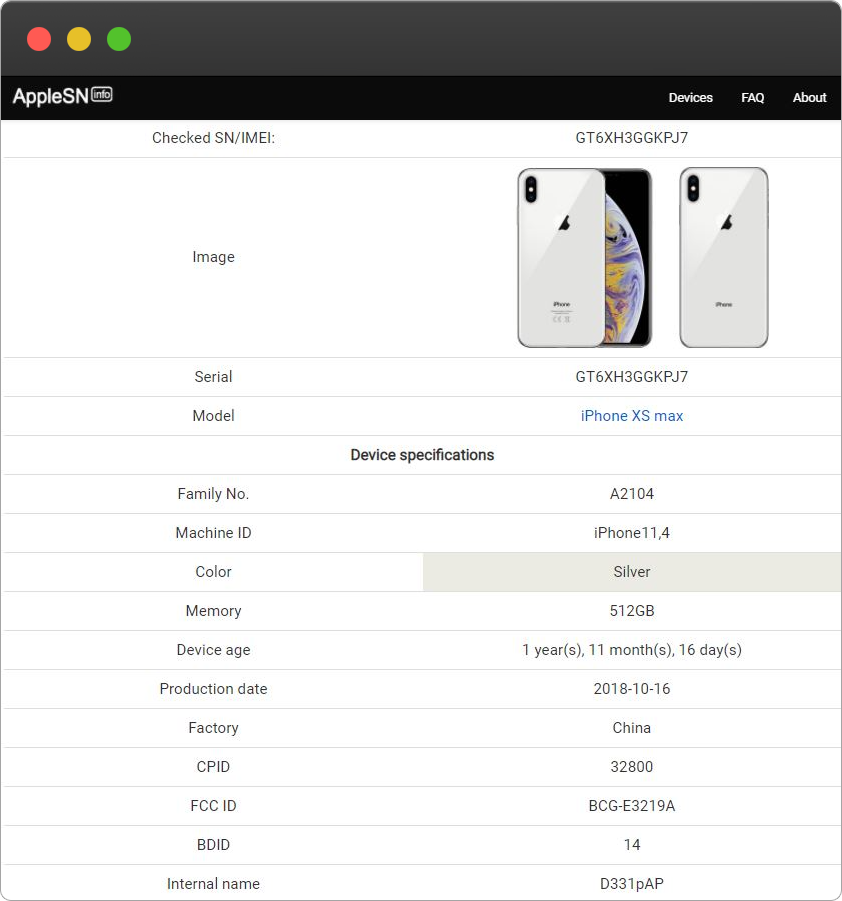
Your iPhone is more than just a device—it’s a valuable asset that holds personal, financial, and technological worth. Whether you’re thinking about repairing it or reselling it, knowing the details about your iPhone can save you time, money, and headaches. An Apple check iPhone warranty Check is the fastest way to get these insights, giving you the confidence to make smart decisions about your device.
What Is an Apple Serial Number?
Every iPhone comes with a unique serial number, a digital fingerprint that contains important information about the device. From the model and configuration to manufacturing date and warranty, this little string of characters reveals a lot.
Why Serial Numbers Matter
Apple assigns serial numbers to:
-
Verify device authenticity
-
Track manufacturing details
-
Determine warranty and service eligibility
-
Identify the exact model and configuration
For iPhone owners, the serial number is like a backstage pass into your device’s history, helping you understand its past and potential future.
Why You Should Check Before Repairing
Many iPhone owners rush to repair their devices without understanding the warranty status or repair history. This can lead to unnecessary expenses or even void warranties.
Confirm Warranty Coverage
A serial number check tells you if your iPhone is still under Apple’s warranty or AppleCare coverage. If your device is covered, certain repairs might be free or significantly cheaper, saving you hundreds of dollars.
Avoid Non-Authorized Repairs
Repairing an iPhone at an unauthorized shop can risk further damage or void the warranty. Knowing your serial number allows Apple technicians to verify the device and ensure proper repair procedures.
Identify Genuine Parts
When repairing your iPhone, it’s important to know whether the replacement parts are original. Serial number verification can reveal whether your iPhone has been previously repaired with non-genuine parts.
Why Serial Number Checks Are Crucial Before Reselling
Selling an iPhone isn’t just about handing over a device—it’s about trust. Buyers want transparency, and serial number checks give it to them.
Verify the Model and Configuration
Some sellers unknowingly misrepresent their iPhones. A serial number check confirms:
-
The exact model
-
Storage capacity
-
Original color and configuration
This ensures buyers know exactly what they are getting, building credibility and trust.
Confirm Activation and Warranty Status
Buyers want to know the warranty status. By checking the serial number, you can confirm:
-
When the iPhone was first activated
-
If it’s still under Apple warranty
-
If AppleCare coverage is still active
Providing this information makes your listing more reliable and can even increase resale value.
Detect Refurbished or Replaced Devices
A serial number check can reveal if an iPhone has been refurbished by Apple or had parts replaced. This is important for pricing and transparency—buyers are willing to pay for a refurbished device but want to know it upfront.
How to Find Your iPhone’s Serial Number
Before you can perform a check, you need the serial number. Apple makes it simple.
On Your iPhone
-
Open Settings
-
Tap General
-
Select About
-
Scroll to view the serial number
Other Places to Check
-
Original packaging
-
Your Apple ID account under Devices
-
SIM tray for some older models
With the serial number in hand, you’re ready to uncover the full history of your iPhone.
Additional Tips for Repairing or Reselling
Inspect the Device Physically
Check for scratches, dents, or replaced parts. These can affect resale value or indicate previous damage.
Verify Battery Health
Go to Settings > Battery > Battery Health to see the maximum capacity and performance of the battery. Replacement batteries are common in refurbished devices and can influence repair decisions or resale pricing.
Be Transparent
If selling, provide all the details uncovered by your serial number check. Transparency builds trust and can even lead to faster sales at better prices.
Common Misconceptions About Serial Number Checks
“It’s Only for Experts”
Anyone can check a serial number in seconds. No technical knowledge is required.
“It Exposes Personal Data”
Serial numbers only provide device-related information, not your photos, messages, or personal files.
“Older Devices Don’t Benefit”
Even older iPhones can be verified, helping you make informed decisions about repairs, resale, or warranty coverage.
Final Thoughts
An Apple Serial Number Check is a quick and essential step before repairing or reselling your iPhone. It tells you everything you need to know about your device—model, manufacturing date, warranty status, and history. By performing this simple check, you save money, avoid scams, and ensure transparency with buyers or repair services.
Your iPhone has a story, and the serial number is the key to unlocking it. Before you spend a dime on repairs or hand it over to a new owner, take a moment to check it—you’ll be glad you did